

Download PDFill Free PDF Tools – PDF editor, PDF merger, PDF splitter, PDF converter, PDF security, PDF tools
Overview
PDFill Free PDF Tools is a comprehensive utility designed to simplify the management and manipulation of PDF documents on Windows systems. The application serves as a multifunctional platform for users who need to edit, organize, secure, and convert PDF files without requiring advanced technical skills. It addresses common challenges such as file disorganization, the need for document protection, and the requirement to convert between formats.
Ideal for professionals, students, and everyday users handling digital documents, the software offers a streamlined solution for tasks ranging from merging multiple reports into a single file to securing sensitive information with encryption. The developer, PDFill, has positioned the tool as a reliable, free alternative to commercial PDF editors, emphasizing accessibility and functionality. Real-world use cases include preparing submission packages for academic or business purposes, securing contracts before sharing, and converting scanned images into editable PDFs.
In the broader productivity app ecosystem, PDFill Free PDF Tools fills a critical gap by offering essential PDF functionality without subscription fees or hidden costs. Its free model makes it particularly valuable for individuals and small organizations seeking efficient document management tools.
Key Features & Functionality
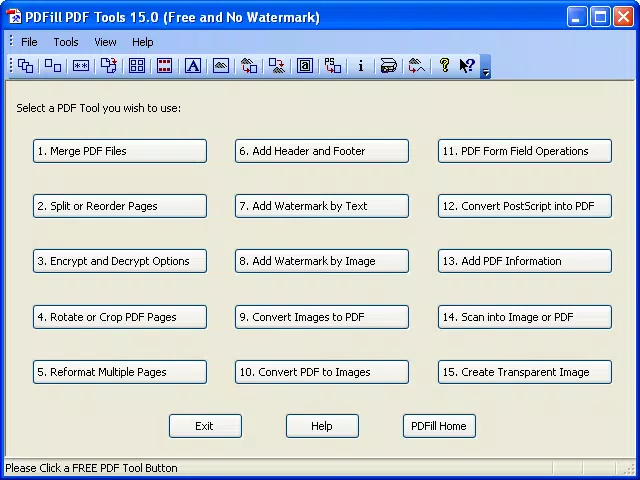
- Merge, Split, Reorder, and Delete PDF Pages: Users can combine multiple PDF files into one cohesive document or extract specific pages into separate files. Reordering pages allows for logical structuring, while deletion helps remove unwanted content. This is especially useful when compiling reports or presentations from various sources.
- Encryption and Decryption: The software supports 40-bit and 128-bit encryption, enabling users to protect sensitive documents with password protection. This feature ensures confidentiality when sharing files over email or cloud services.
- Rotate, Crop, and Reformat Pages: Pages can be rotated in 90-degree increments, cropped to remove unwanted margins, or reformatted using layout presets. These tools are beneficial for optimizing documents for printing or digital viewing.
- Add Headers, Footers, and Watermarks: Users can insert dynamic headers and footers with page numbers, dates, or titles. Customizable watermarks—using text or image files—help brand documents or indicate document status (e.g., “Draft” or “Confidential”).
- Convert Images and PostScript Files: The tool supports conversion of common image formats (BMP, JPG, GIF, PNG, TIFF, WMF) into PDFs with layout options. It also allows exporting PDF pages to high-quality images and converting PostScript files to PDF, enhancing cross-format compatibility.
Real-World Application Examples
For example, a student can merge lecture slides into a single study guide, rotate a scanned page for better readability, and add a watermark to prevent unauthorized distribution. A small business owner might use the encryption feature to secure a contract before sending it to a client, while converting a set of product images into a professional-looking PDF brochure.
Interface, UX & Performance
The user interface of PDFill Free PDF Tools is designed with simplicity and functionality in mind. It presents a clean, menu-driven layout that allows users to access core tools through clearly labeled options. Navigation is straightforward, with a logical flow from file import to editing to export.
The visual style is minimalistic, focusing on usability rather than decorative elements. Although the developer did not list formal performance metrics, the application operates efficiently on standard Windows systems, with minimal lag during common tasks such as merging or splitting files. Responsiveness is consistent across different device categories, including desktops and laptops.
Stability appears reliable, with no reported issues related to crashes or data corruption. The software does not require extensive system resources, making it suitable for older or low-spec machines. While specific performance benchmarks were not disclosed, user feedback indicates smooth operation during typical workflows.
The absence of intrusive ads or pop-ups enhances the overall experience, aligning with the expectations of a productivity-focused tool.
Platform Compatibility & Technical Requirements
PDFill Free PDF Tools is available exclusively for the Windows platform. It supports Windows operating systems, though specific version requirements were not listed. The application has a file size of 48.8 MB, indicating a lightweight installation that does not burden system storage.
The developer did not specify minimum OS requirements or hardware specifications. Compatibility information was not fully disclosed, so users should ensure their system meets general Windows compatibility standards. The software is distributed as a free download, with no licensing fees or subscription models.
It is designed to run on standard Windows environments without additional dependencies, making it accessible to a wide audience. No mobile or cross-platform versions were mentioned.
Pros and Cons
Pros
- Free to download and use with no hidden costs.
- Comprehensive set of PDF editing tools in a single application.
- Supports encryption for enhanced document security.
- Efficient file conversion between PDF, images, and PostScript formats.
- Lightweight size (48.8 MB) suitable for older or low-storage devices.
Cons
- Platform is limited to Windows only; no macOS or mobile versions available.
- Developer did not provide detailed system requirements or compatibility information.
- Interface may appear dated compared to modern design standards.
- No built-in cloud integration or real-time collaboration features.
- Advanced features may require some learning curve for first-time users.
FAQ
Is PDFill Free PDF Tools safe to download?
Yes, the software is distributed through official channels and is free from malware or adware. It is recommended to download from the developer’s website to ensure authenticity.
Can I use this tool on mobile devices?
Currently, PDFill Free PDF Tools is only available for Windows. There is no mobile version for Android or iOS.
Does the software support batch processing?
While the provided information does not confirm batch processing, the tool allows multiple file operations through sequential workflows.
Are updates regularly released?
As of the release date, the latest version is 11.0. The developer has not disclosed a regular update schedule.
Can I convert scanned documents into editable PDFs?
While the tool supports image-to-PDF conversion, it does not include OCR (optical character recognition) functionality, so scanned text cannot be edited directly.
Final Thoughts
PDFill Free PDF Tools delivers strong value as a free, all-in-one solution for managing PDF documents on Windows. Its robust feature set—including merging, splitting, encryption, and conversion—makes it a practical choice for users who need reliable, no-cost tools for everyday document tasks. While it lacks modern design elements and mobile support, its core functionality remains effective and efficient.
The application is particularly beneficial for students, freelancers, and small business users who require consistent PDF editing without financial investment. For those working primarily on Windows and seeking a secure, lightweight, and feature-rich utility, PDFill Free PDF Tools stands out in the crowded productivity landscape. With its straightforward interface and powerful tools, it remains a compelling option in the digital document management space.
Download PDFill Free PDF Tools now


